Part1:For adding products into EC-video
step1, create a video


first
second
third
step2,add product into EC-video
|
After finfish the video,click add link
|
You can add product from showcase
|
You can also add product from affiliate by click 【add more product】in previous page
|
Input the product name which will show on the EC-video
|
click post
|
|
|
|
|
|
|
Part2,For adding products into EC-Live
Adding products to TikTokAPP
|
step1,click the [+] and get into EC-Live
|
step2,click the 【product】 button to add product into EC-live
|
step3,select the product from showcase
|
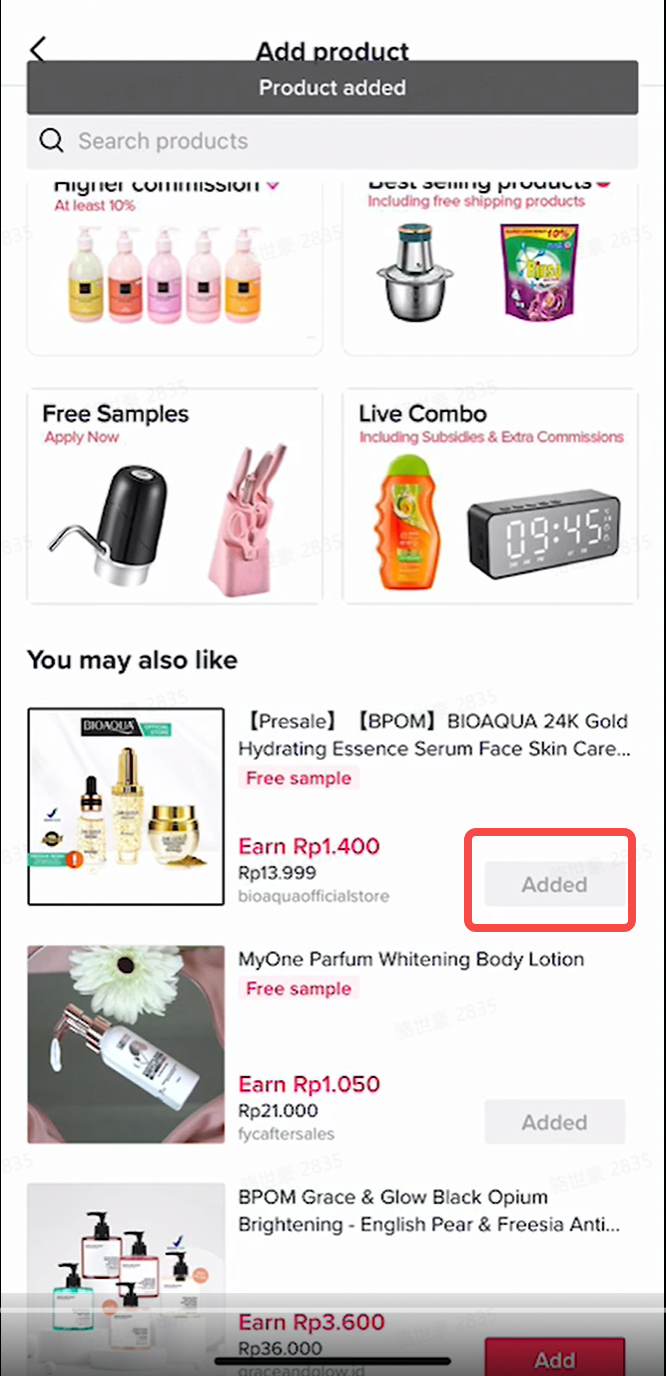
step4,you can also select product from affiliate
|
step5,after finish adding products into shopLIVE, click GO LIVE to start EC-live
|
|
|
|
|
|
|
Adding products to Livestreaming Dashboard
|
Feature
|
Demo
|
Instruction
|
|
Showcase – Add products to Livestream
|
|
Livestream Products => Add new Product => Showcase Products
|
|
URL – Add products to Livestream
|
|
Use the product URL to add Targeted Plan product
copy the product link from seller center – Manage products
|
|
Targeted plan – Add products to Livestream
|
|
Livestream Products => Add new Product => Targeted Plan Products
|
© 版权声明
以上内容来源于网络或收集整理,内容属作者个人观点,不代表TKTOC立场!文章版权归作者所有,未经允许请勿转载。
TKTOC跨境导航将时刻关注并搜集TikTok最新风向、实战干货、变现玩法等,欢迎扫码关注公众号,获取更多跨境电商资讯。